> ## Documentation Index
> Fetch the complete documentation index at: https://aipro.placetel.de/docs/llms.txt
> Use this file to discover all available pages before exploring further.
# API Requests
> Configuring external API integrations for voice agents.
You can create API request definitions in the **API Requests** tab of the Voice Wizard. Click **"Add API request"** and you will see the following input form with the fields explained below.
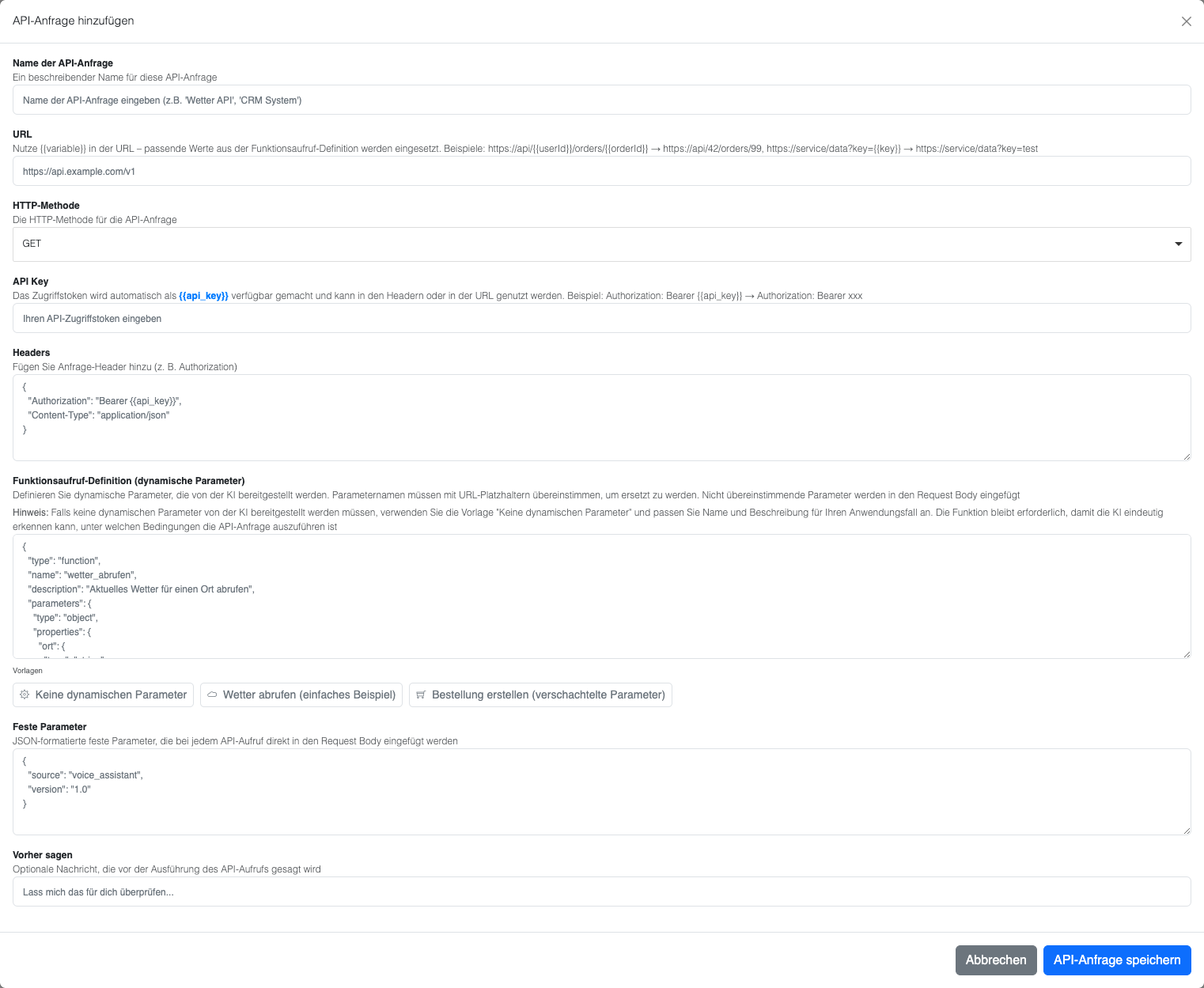 ## Form fields explained
### API request name
A descriptive name for your API request (e.g. "Create product order")
### URL
The API endpoint URL. You can use placeholders like `{{userId}}`, which are replaced with values from your **dynamic** function parameters.
* Example: `https://api.shop.com/orders/{{userId}}`
### HTTP method
Choose the HTTP method for your request (GET, POST, PUT, DELETE, etc.)
### API key
Your authentication token. It automatically replaces all `{{api_key}}` placeholders in your URL or headers.
### Headers
HTTP headers for your request in JSON format:
```json theme={null}
{
"Authorization": "Bearer {{api_key}}",
"Content-Type": "application/json"
}
```
* `{{api_key}}` is replaced with your API key
### Function definition (dynamic parameters)
Define the parameters that users can pass when calling your function:
```json theme={null}
{
"type": "function",
"name": "place_order",
"description": "Bestellt ein Produkt für einen Kunden",
"parameters": {
"type": "object",
"properties": {
"userId": {
"type": "string",
"description": "Kunden-Benutzer-ID"
},
"orderDetails": {
"type": "object",
"properties": {
"product": {"type": "string"},
"quantity": {"type": "number"}
}
}
}
}
}
```
These parameters will:
* Replace matching placeholders in the URL and headers
* **All dynamic parameters that do not match any placeholder are added to the request body**
* **Works with nested objects** -- e.g. the `orderDetails` object is preserved in the body
### Fixed parameters
Static values that are always included in every request:
```json theme={null}
{
"storeId": "STORE_123",
"paymentMethod": "credit_card",
"currency": "USD"
}
```
These are:
* **Always added to the request body unchanged**
* They do NOT replace placeholders in headers or the URL
### Say before
An optional message the AI assistant says to the user before the API request is executed. For example: "Ich erstelle jetzt Ihre Bestellung..." or "Einen Moment, ich rufe die Produktinformationen ab..."
## Example: GET request without dynamic parameters
Some API calls don't need any parameters from the AI -- for example "Get all products". In this case, a function definition is still required so that the AI triggers the API request.
## Form fields explained
### API request name
A descriptive name for your API request (e.g. "Create product order")
### URL
The API endpoint URL. You can use placeholders like `{{userId}}`, which are replaced with values from your **dynamic** function parameters.
* Example: `https://api.shop.com/orders/{{userId}}`
### HTTP method
Choose the HTTP method for your request (GET, POST, PUT, DELETE, etc.)
### API key
Your authentication token. It automatically replaces all `{{api_key}}` placeholders in your URL or headers.
### Headers
HTTP headers for your request in JSON format:
```json theme={null}
{
"Authorization": "Bearer {{api_key}}",
"Content-Type": "application/json"
}
```
* `{{api_key}}` is replaced with your API key
### Function definition (dynamic parameters)
Define the parameters that users can pass when calling your function:
```json theme={null}
{
"type": "function",
"name": "place_order",
"description": "Bestellt ein Produkt für einen Kunden",
"parameters": {
"type": "object",
"properties": {
"userId": {
"type": "string",
"description": "Kunden-Benutzer-ID"
},
"orderDetails": {
"type": "object",
"properties": {
"product": {"type": "string"},
"quantity": {"type": "number"}
}
}
}
}
}
```
These parameters will:
* Replace matching placeholders in the URL and headers
* **All dynamic parameters that do not match any placeholder are added to the request body**
* **Works with nested objects** -- e.g. the `orderDetails` object is preserved in the body
### Fixed parameters
Static values that are always included in every request:
```json theme={null}
{
"storeId": "STORE_123",
"paymentMethod": "credit_card",
"currency": "USD"
}
```
These are:
* **Always added to the request body unchanged**
* They do NOT replace placeholders in headers or the URL
### Say before
An optional message the AI assistant says to the user before the API request is executed. For example: "Ich erstelle jetzt Ihre Bestellung..." or "Einen Moment, ich rufe die Produktinformationen ab..."
## Example: GET request without dynamic parameters
Some API calls don't need any parameters from the AI -- for example "Get all products". In this case, a function definition is still required so that the AI triggers the API request.
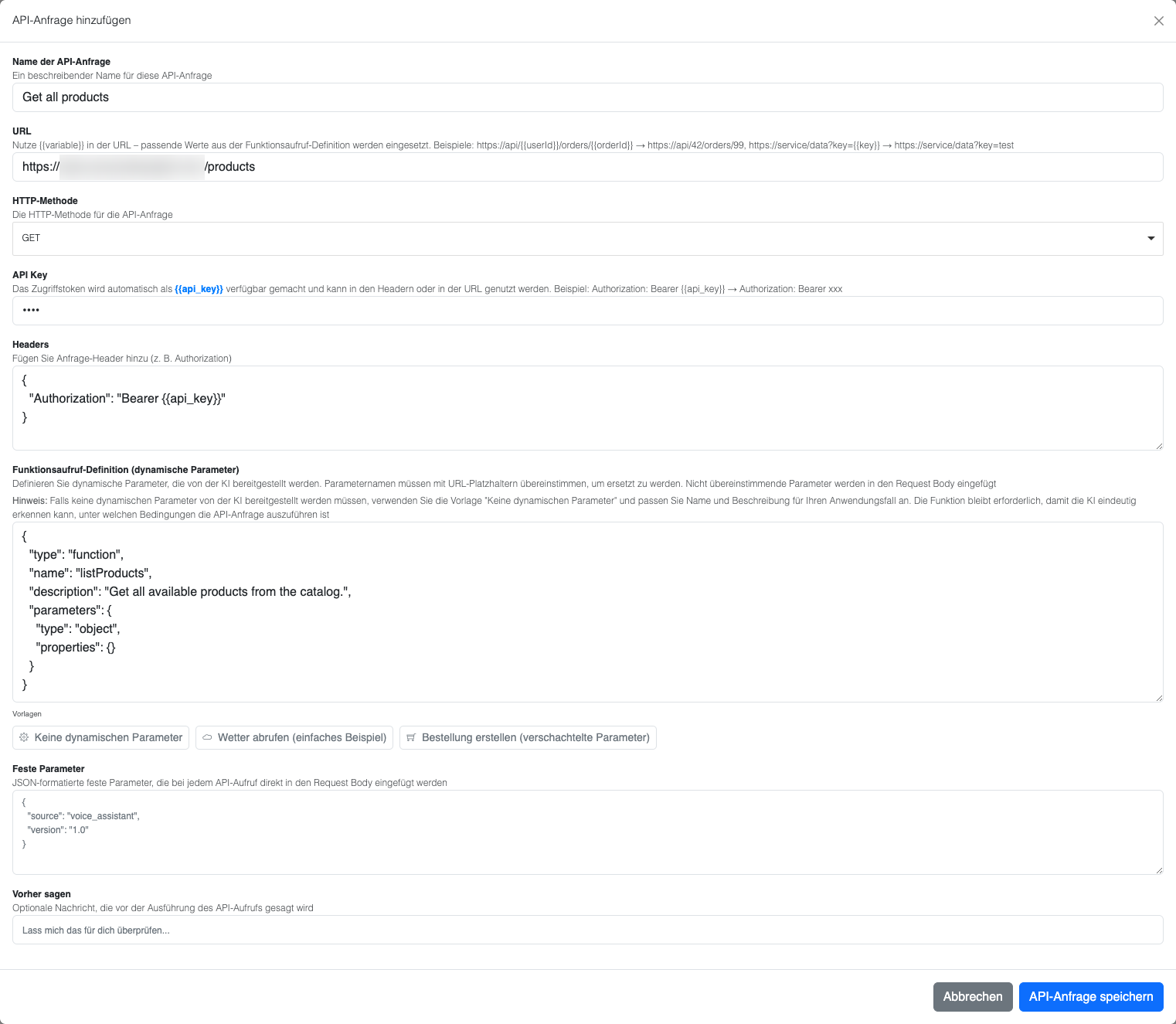 ### Configuration for "Get all products"
* **API request name**: "Get all products"
* **URL**: `https://example.proxy.beeceptor.com/products` (example test endpoint)
* **HTTP method**: GET
* **API key**: (empty or your API key)
* **Headers**: Standard GET headers
### Function definition without parameters
Click **"No dynamic parameters"** to get a template:
```json theme={null}
{
"type": "function",
"name": "listProducts",
"description": "Get all available products from the catalog",
"parameters": {
"type": "object",
"properties": {}
}
}
```
**Important:**
* A meaningful **function name** and **description** are crucial, because the AI needs to understand when to call the function
* Add explicit instructions in the **user prompt** if the AI has trouble
* The empty `properties: {}` is required for a valid function definition
### Resulting HTTP request
Based on the configuration above, the following HTTP request is created:
```
GET https://example.proxy.beeceptor.com/products
Content-Type: application/json
```
**Explanation:**
* **URL**: Direct URL without placeholder substitutions
* **Headers**: GET headers with Bearer API token
* **Parameters**: No dynamic parameters required
## How the final request is built
1. **URL**: Placeholders are replaced with dynamic function parameters
2. **Headers**: `{{api_key}}` is replaced with the API key, other placeholders with dynamic parameter values
3. **Body**: Combination of fixed parameters + dynamic parameters that don't match any placeholder
### Example of the final HTTP request
Based on the parameters above, the following HTTP request is created:
```
POST https://api.shop.com/orders/user123
Authorization: Bearer YOUR_API_KEY_HERE
Content-Type: application/json
{
"storeId": "STORE_123",
"paymentMethod": "credit_card",
"currency": "USD",
"orderDetails": {
"product": "Wireless Headphones",
"quantity": 2
}
}
```
**Explanation:**
* **URL**: `{{userId}}` was replaced with "user123"
* **Headers**: `{{api_key}}` was replaced with your actual API key
* **Body**: Contains both fixed parameters (storeId, paymentMethod, currency) and dynamic parameters (orderDetails)
### Configuration for "Get all products"
* **API request name**: "Get all products"
* **URL**: `https://example.proxy.beeceptor.com/products` (example test endpoint)
* **HTTP method**: GET
* **API key**: (empty or your API key)
* **Headers**: Standard GET headers
### Function definition without parameters
Click **"No dynamic parameters"** to get a template:
```json theme={null}
{
"type": "function",
"name": "listProducts",
"description": "Get all available products from the catalog",
"parameters": {
"type": "object",
"properties": {}
}
}
```
**Important:**
* A meaningful **function name** and **description** are crucial, because the AI needs to understand when to call the function
* Add explicit instructions in the **user prompt** if the AI has trouble
* The empty `properties: {}` is required for a valid function definition
### Resulting HTTP request
Based on the configuration above, the following HTTP request is created:
```
GET https://example.proxy.beeceptor.com/products
Content-Type: application/json
```
**Explanation:**
* **URL**: Direct URL without placeholder substitutions
* **Headers**: GET headers with Bearer API token
* **Parameters**: No dynamic parameters required
## How the final request is built
1. **URL**: Placeholders are replaced with dynamic function parameters
2. **Headers**: `{{api_key}}` is replaced with the API key, other placeholders with dynamic parameter values
3. **Body**: Combination of fixed parameters + dynamic parameters that don't match any placeholder
### Example of the final HTTP request
Based on the parameters above, the following HTTP request is created:
```
POST https://api.shop.com/orders/user123
Authorization: Bearer YOUR_API_KEY_HERE
Content-Type: application/json
{
"storeId": "STORE_123",
"paymentMethod": "credit_card",
"currency": "USD",
"orderDetails": {
"product": "Wireless Headphones",
"quantity": 2
}
}
```
**Explanation:**
* **URL**: `{{userId}}` was replaced with "user123"
* **Headers**: `{{api_key}}` was replaced with your actual API key
* **Body**: Contains both fixed parameters (storeId, paymentMethod, currency) and dynamic parameters (orderDetails)