> ## Documentation Index
> Fetch the complete documentation index at: https://aipro.placetel.de/docs/llms.txt
> Use this file to discover all available pages before exploring further.
# Microsoft Outlook Calendar
> Connect an Outlook calendar -- find available slots and book appointments directly.
## Overview
With the **Microsoft Outlook Calendar integration**, your voice agent can find available slots in a connected Outlook calendar and book new appointments directly. You connect Outlook **once** via Microsoft's OAuth flow and then create the calendar tools you want from it.
**Security:** You are redirected to Microsoft to confirm access. The credentials are stored encrypted on the server and are only accessible to your account.
## Setting up the integration
1. Open the **Tools** page in the sidebar
2. Click **Create tool** and select **Microsoft Outlook Calendar**
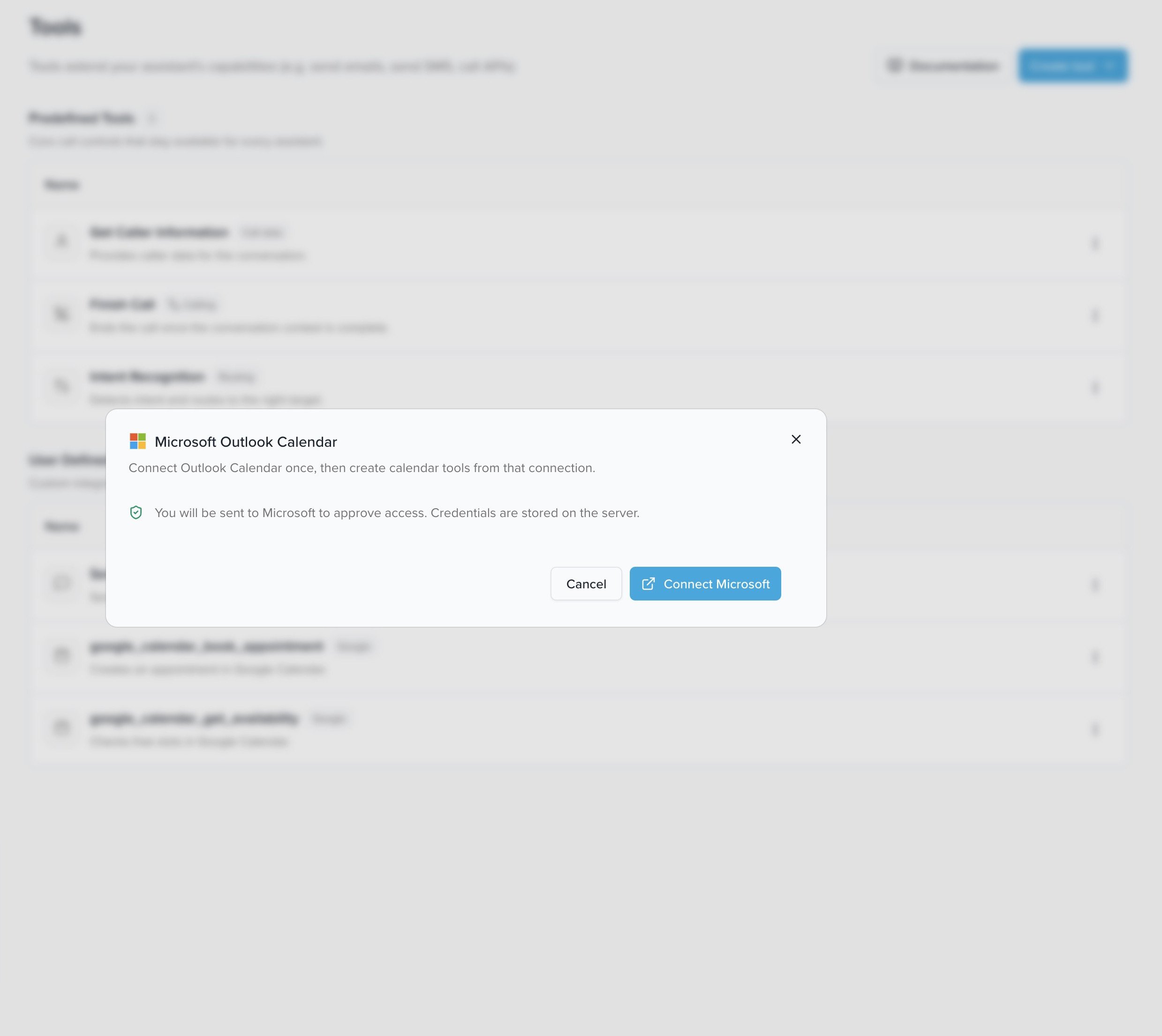
3. Confirm in the dialog with **Connect Microsoft** -- you are redirected to Microsoft
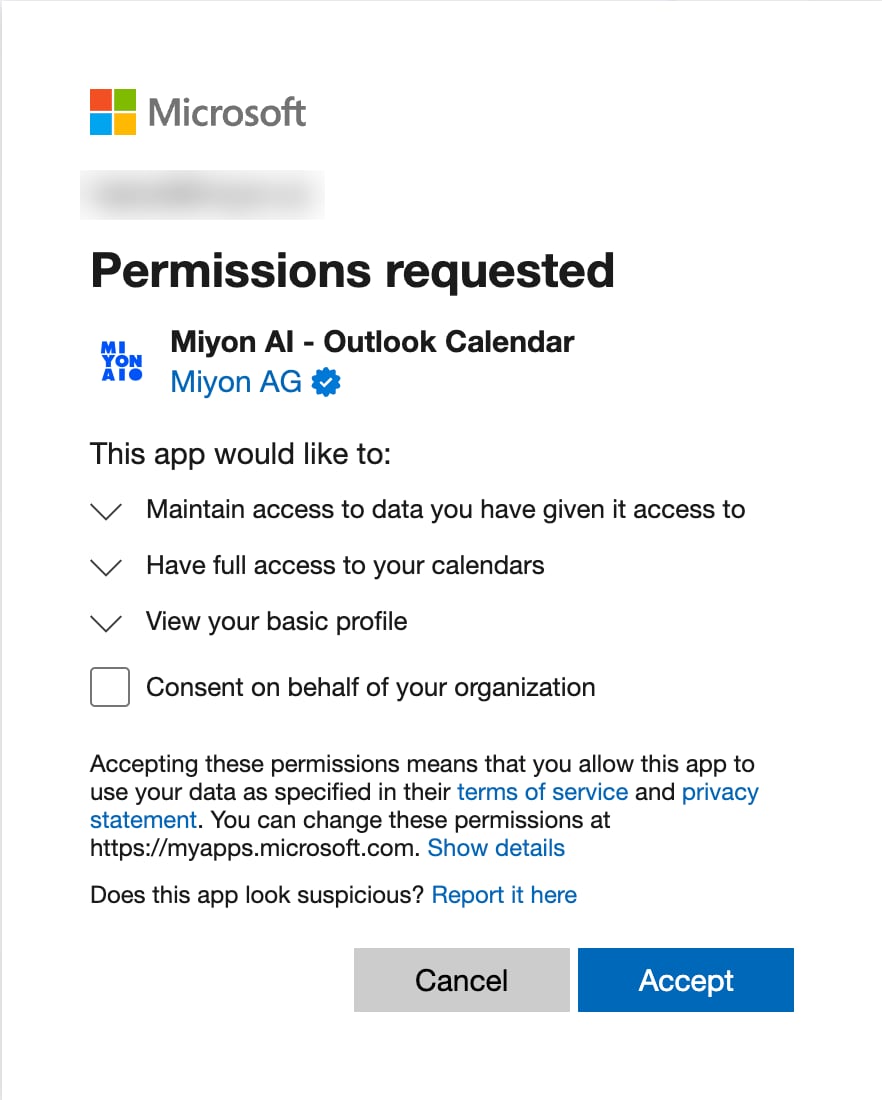
 4. Follow Microsoft's OAuth flow and confirm the requested permissions with **Accept**
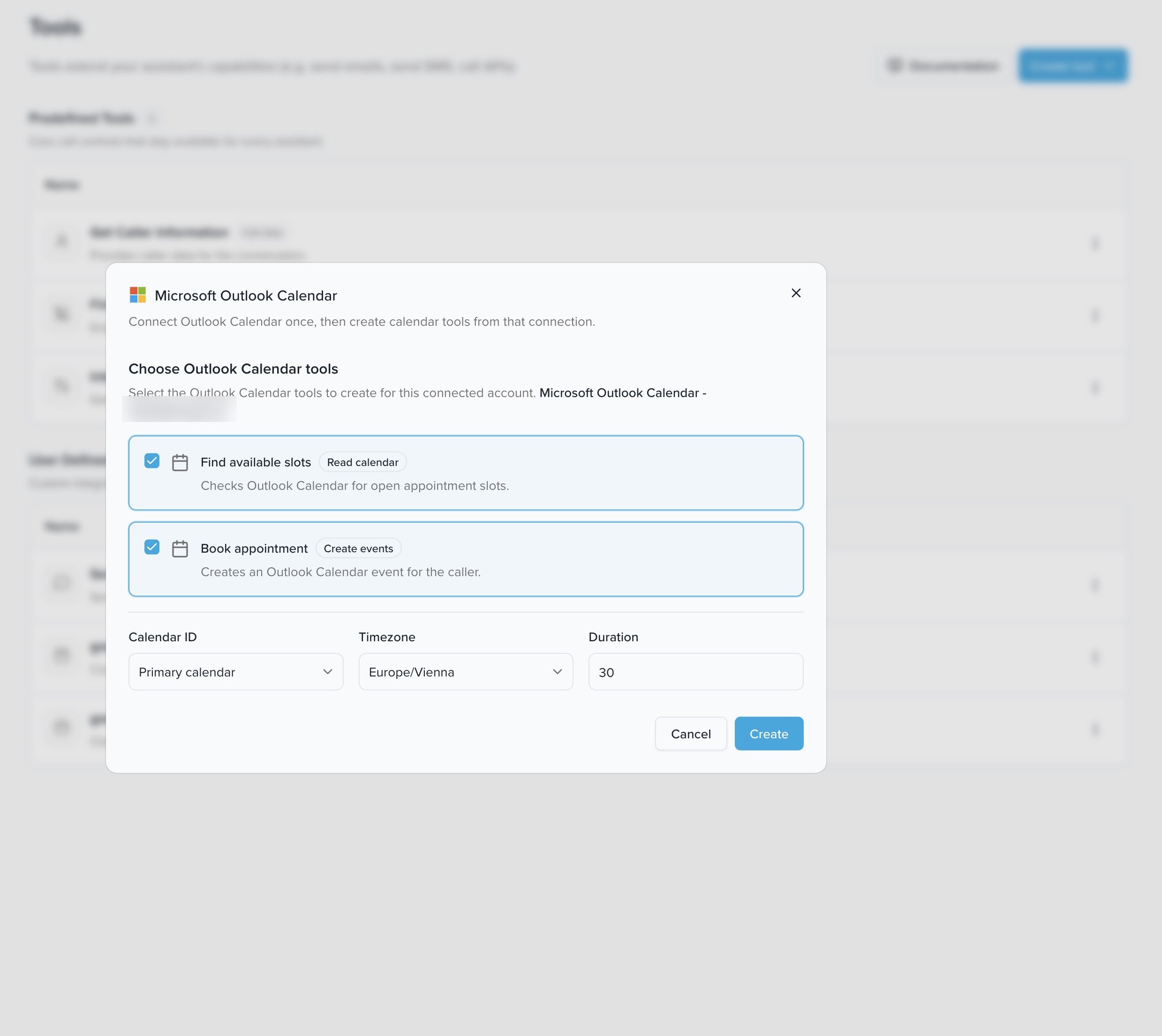
 5. Choose the calendar tools to create for the connected account (**Find available slots** and/or **Book appointment**) and set the **Calendar ID**, **Timezone**, and **Duration** (default appointment duration in minutes). Click **Create**
 6. Open the voice agent you want and switch to the **Tools** tab. There, enable the Outlook tools for this agent
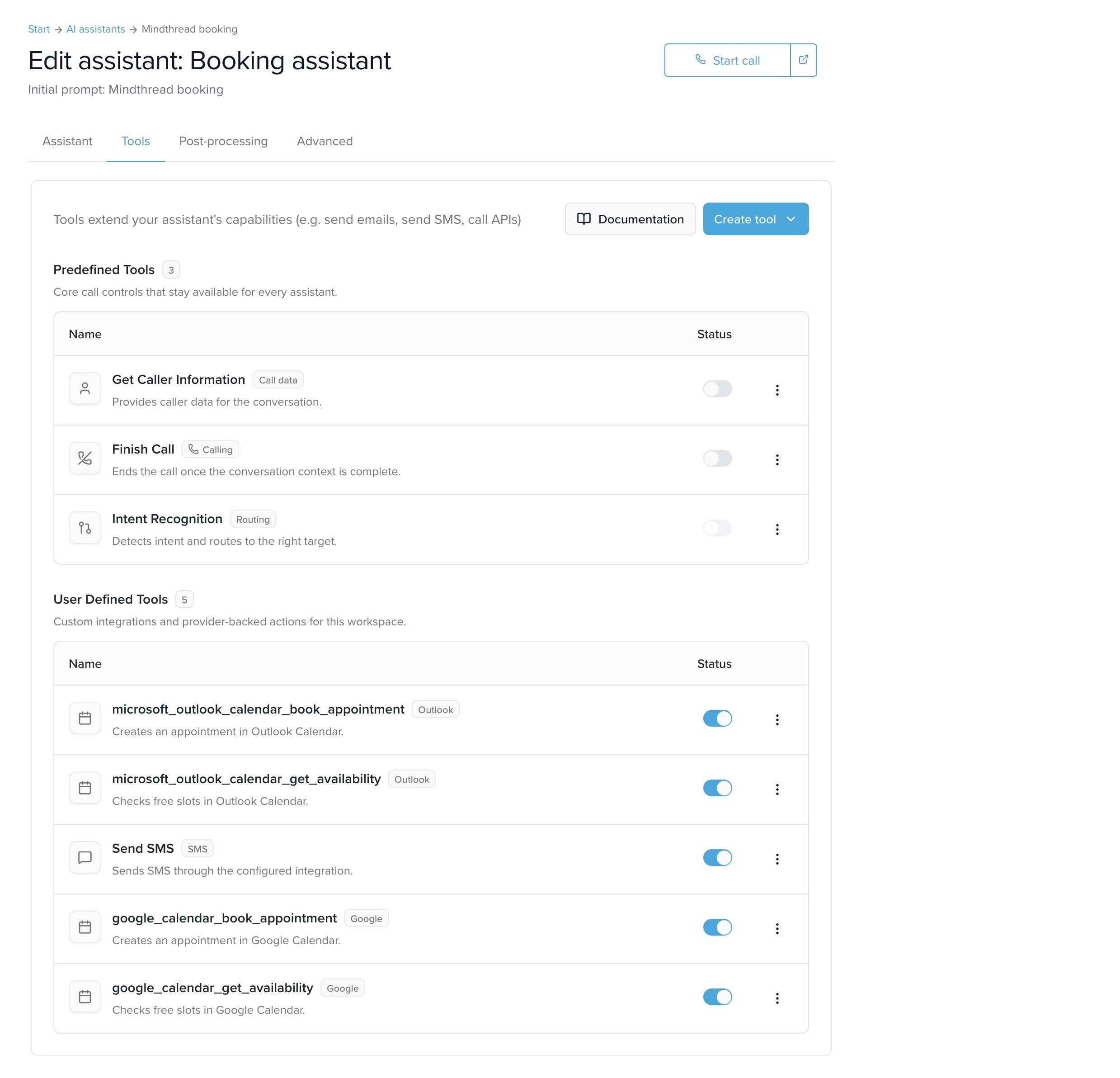 **Shared tools:** Like all tools, the Outlook tools are available globally once created. You only need to enable them per voice agent in the **Tools** tab. Learn more at [Tools](/docs/en/tools).
## Available tools
When connecting, up to two tools are created:
### `microsoft_outlook_calendar_get_availability`
Finds available time slots in the connected Outlook calendar (**Read calendar**). Typical use: the caller asks about available appointments before booking.
| Parameter | Type | Required | Description |
| ----------------------- | ------- | -------- | ----------------------------------------------------------------------------------------- |
| `time_min` | string | Yes | Start of the search window as an ISO 8601 date-time |
| `time_max` | string | Yes | End of the search window as an ISO 8601 date-time |
| `calendar_id` | string | No | Optional Outlook calendar ID. Defaults to the configured calendar or the primary calendar |
| `slot_duration_minutes` | integer | No | Optional duration of a time slot in minutes |
### `microsoft_outlook_calendar_book_appointment`
Creates an appointment in the connected Outlook calendar (**Create events**). Typical use: the caller has chosen an available slot and the appointment is booked.
| Parameter | Type | Required | Description |
| ---------------- | ------ | -------- | ----------------------------------------------------------------------------------------- |
| `summary` | string | Yes | Title of the calendar event |
| `start_time` | string | Yes | Start of the appointment as an ISO 8601 date-time |
| `end_time` | string | Yes | End of the appointment as an ISO 8601 date-time |
| `calendar_id` | string | No | Optional Outlook calendar ID. Defaults to the configured calendar or the primary calendar |
| `description` | string | No | Optional description of the appointment |
| `location` | string | No | Optional location of the appointment |
| `attendee_email` | string | No | Optional email address of an attendee |
**Typical flow:** Combine both tools -- the voice agent first calls `microsoft_outlook_calendar_get_availability` to offer available slots, then books the slot the caller picked with `microsoft_outlook_calendar_book_appointment`.
## Booking appointments -- prompting notes
For the voice agent to call the booking tool reliably, your prompt should describe **which details it needs to collect** and **how to handle missing or vague information**. The required details are **title**, **start**, and **end** -- start and end must be resolved to a concrete date with a time before booking.
### Example: minimal booking
> „Buche morgen um 14:00 einen Beratungstermin für 30 Minuten."
```json theme={null}
{
"summary": "Beratungstermin",
"start_time": "2026-06-09T14:00:00+02:00",
"end_time": "2026-06-09T14:30:00+02:00"
}
```
### Example: booking with attendee and location
> „Buche morgen um 14:00 ein Telefongespräch mit Max. Seine E-Mail ist [max@example.com](mailto:max@example.com)."
```json theme={null}
{
"summary": "Telefongespräch mit Max Mustermann",
"start_time": "2026-06-09T14:00:00+02:00",
"end_time": "2026-06-09T14:30:00+02:00",
"location": "Telefongespräch",
"attendee_email": "max@example.com"
}
```
### What the agent should clarify
If a detail is missing, the agent should ask a targeted follow-up question before calling the tool:
| Missing | Example follow-up question |
| -------- | ---------------------------------------------------------------------------- |
| Date | „An welchem Tag soll ich den Termin buchen?" |
| Time | „Um wie viel Uhr passt es Ihnen am besten?" |
| Duration | „Wie lange soll der Termin dauern?" |
| Email | „Soll ich eine Kalendereinladung senden? Wenn ja, an welche E-Mail-Adresse?" |
| Location | „Soll das ein Telefongespräch, ein Online-Meeting oder vor Ort sein?" |
### Rules for the prompt
* Collect all missing **required details** before the tool is called.
* For vague time expressions like „morgen Nachmittag" (tomorrow afternoon), ask for a concrete time -- or first offer available slots with `microsoft_outlook_calendar_get_availability`.
* If the caller only gives a start but no duration, use the **default appointment duration** from the tool configuration. If none is configured, ask for the duration.
* Resolve relative dates like „morgen" (tomorrow) or „nächsten Montag" (next Monday) in the **caller's time zone**.
* Do **not** mention technical fields like `calendar_id` to the caller -- unless the business uses multiple calendars and the caller needs to pick one.
### Good caller phrasings
* „Buchen Sie mir morgen um 2 einen Termin."
* „Vereinbaren Sie nächsten Montag vormittags eine Beratung."
* „Können Sie mir für Freitag um 10 einen Termin eintragen?"
* „Buchen Sie ein Telefongespräch und schicken Sie mir eine Einladung."
**Business defaults:** You set the **timezone** and **default appointment duration** once when creating the tool (step 5 under [Setting up the integration](#setting-up-the-integration)). So the agent doesn't have to ask for them on every call -- it uses them automatically when the caller doesn't specify their own.
**Shared tools:** Like all tools, the Outlook tools are available globally once created. You only need to enable them per voice agent in the **Tools** tab. Learn more at [Tools](/docs/en/tools).
## Available tools
When connecting, up to two tools are created:
### `microsoft_outlook_calendar_get_availability`
Finds available time slots in the connected Outlook calendar (**Read calendar**). Typical use: the caller asks about available appointments before booking.
| Parameter | Type | Required | Description |
| ----------------------- | ------- | -------- | ----------------------------------------------------------------------------------------- |
| `time_min` | string | Yes | Start of the search window as an ISO 8601 date-time |
| `time_max` | string | Yes | End of the search window as an ISO 8601 date-time |
| `calendar_id` | string | No | Optional Outlook calendar ID. Defaults to the configured calendar or the primary calendar |
| `slot_duration_minutes` | integer | No | Optional duration of a time slot in minutes |
### `microsoft_outlook_calendar_book_appointment`
Creates an appointment in the connected Outlook calendar (**Create events**). Typical use: the caller has chosen an available slot and the appointment is booked.
| Parameter | Type | Required | Description |
| ---------------- | ------ | -------- | ----------------------------------------------------------------------------------------- |
| `summary` | string | Yes | Title of the calendar event |
| `start_time` | string | Yes | Start of the appointment as an ISO 8601 date-time |
| `end_time` | string | Yes | End of the appointment as an ISO 8601 date-time |
| `calendar_id` | string | No | Optional Outlook calendar ID. Defaults to the configured calendar or the primary calendar |
| `description` | string | No | Optional description of the appointment |
| `location` | string | No | Optional location of the appointment |
| `attendee_email` | string | No | Optional email address of an attendee |
**Typical flow:** Combine both tools -- the voice agent first calls `microsoft_outlook_calendar_get_availability` to offer available slots, then books the slot the caller picked with `microsoft_outlook_calendar_book_appointment`.
## Booking appointments -- prompting notes
For the voice agent to call the booking tool reliably, your prompt should describe **which details it needs to collect** and **how to handle missing or vague information**. The required details are **title**, **start**, and **end** -- start and end must be resolved to a concrete date with a time before booking.
### Example: minimal booking
> „Buche morgen um 14:00 einen Beratungstermin für 30 Minuten."
```json theme={null}
{
"summary": "Beratungstermin",
"start_time": "2026-06-09T14:00:00+02:00",
"end_time": "2026-06-09T14:30:00+02:00"
}
```
### Example: booking with attendee and location
> „Buche morgen um 14:00 ein Telefongespräch mit Max. Seine E-Mail ist [max@example.com](mailto:max@example.com)."
```json theme={null}
{
"summary": "Telefongespräch mit Max Mustermann",
"start_time": "2026-06-09T14:00:00+02:00",
"end_time": "2026-06-09T14:30:00+02:00",
"location": "Telefongespräch",
"attendee_email": "max@example.com"
}
```
### What the agent should clarify
If a detail is missing, the agent should ask a targeted follow-up question before calling the tool:
| Missing | Example follow-up question |
| -------- | ---------------------------------------------------------------------------- |
| Date | „An welchem Tag soll ich den Termin buchen?" |
| Time | „Um wie viel Uhr passt es Ihnen am besten?" |
| Duration | „Wie lange soll der Termin dauern?" |
| Email | „Soll ich eine Kalendereinladung senden? Wenn ja, an welche E-Mail-Adresse?" |
| Location | „Soll das ein Telefongespräch, ein Online-Meeting oder vor Ort sein?" |
### Rules for the prompt
* Collect all missing **required details** before the tool is called.
* For vague time expressions like „morgen Nachmittag" (tomorrow afternoon), ask for a concrete time -- or first offer available slots with `microsoft_outlook_calendar_get_availability`.
* If the caller only gives a start but no duration, use the **default appointment duration** from the tool configuration. If none is configured, ask for the duration.
* Resolve relative dates like „morgen" (tomorrow) or „nächsten Montag" (next Monday) in the **caller's time zone**.
* Do **not** mention technical fields like `calendar_id` to the caller -- unless the business uses multiple calendars and the caller needs to pick one.
### Good caller phrasings
* „Buchen Sie mir morgen um 2 einen Termin."
* „Vereinbaren Sie nächsten Montag vormittags eine Beratung."
* „Können Sie mir für Freitag um 10 einen Termin eintragen?"
* „Buchen Sie ein Telefongespräch und schicken Sie mir eine Einladung."
**Business defaults:** You set the **timezone** and **default appointment duration** once when creating the tool (step 5 under [Setting up the integration](#setting-up-the-integration)). So the agent doesn't have to ask for them on every call -- it uses them automatically when the caller doesn't specify their own.