> ## Documentation Index
> Fetch the complete documentation index at: https://aipro.placetel.de/docs/llms.txt
> Use this file to discover all available pages before exploring further.
# Workshop Appointments (TKP)
> Automated workshop appointment booking via the TKP/soft-nrg integration.
## Overview
With the **Workshop Appointments** integration (TKP), your AI voice agent can automatically schedule workshop appointments for your **existing customers**. The agent looks up the customer by their license plate number, offers the available services, finds free time slots, and books the requested appointment -- fully automated over the phone.
**Current status:** The integration currently supports **existing customers** who are already registered in your workshop system (TKP/soft-nrg). If a caller is not found, they are forwarded to a staff member.
## Prerequisites
Before you can set up Workshop Appointments, you need:
### 1. Create a JWT OAuth provider
You need a **JWT OAuth provider** with the credentials (fingerprint) from soft-nrg / TKP. Create it under **OAuth Providers**.
A detailed guide is available here: [OAuth Providers documentation - Example: TKP](/docs/en/oauth-providers#example-tkp-workshop-planning)
### 2. Create an AI voice agent
If you don't have one yet, create a new voice agent. You can use the prebuilt template **"Werkstatt-Termine (Bestandskunden)"** (workshop appointments for existing customers).
## Step-by-step setup
In your voice agent, navigate to **Tools -> Workshop Appointments**.
### Step 1: Name and OAuth provider
* **Tool name:** Choose a unique name (e.g. "BMW Autohaus München").
* **OAuth provider:** Select the JWT OAuth provider you created earlier.
Once the OAuth provider is selected, the available branches are loaded automatically.
### Step 2: Select a branch
Select the branch for which the voice agent should manage appointments.
**Important:** The selected branch is used for **all** functions of this tool -- customer lookup, appointment search, appointment booking, etc. always take place in this branch. If you operate multiple branches, create a separate voice agent for each branch with its own Workshop Appointments tool and its own phone number.
### Step 3: Select services
See the next section [Services](#services) for details.
### Step 4: Select functions
In the last step, you choose which functions your voice agent is allowed to use. The functions are divided into three groups:
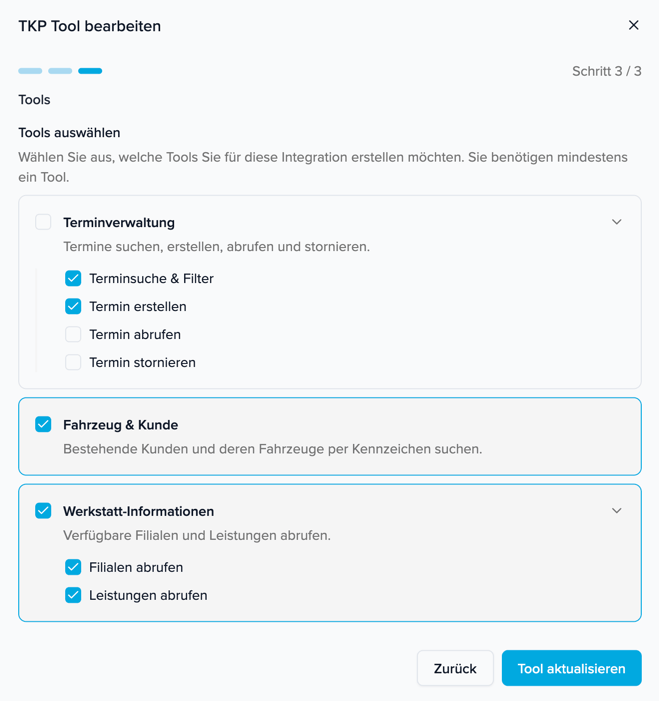 | Group | Function | Description | Example use case |
| -------------------------- | ---------------------------- | ---------------------------------------------------------------------- | ------------------------------------------------------------------------------------------------------------------------------------------------------- |
| **Appointment management** | Appointment search & filters | Searches available time slots and filters by date, time of day, etc. | *A customer wants to schedule an appointment -- the agent searches for free time slots matching the preferred date and time of day.* |
| | Create appointment | Books a new workshop appointment for the customer. | *The customer has chosen and confirmed a suitable slot -- the agent books the appointment in the system.* |
| | Retrieve appointment | Retrieves details of an existing appointment (status, date, services). | *A customer calls and asks: "Is my car ready for pickup?" -- the agent checks the status of the appointment.* |
| | Cancel appointment | Cancels an existing appointment. Requires the appointment key. | *A customer calls and wants to cancel their appointment -- the agent first looks up the appointment by phone number and cancels it after confirmation.* |
| **Vehicle & customer** | Search customer vehicles | Looks up existing customers by license plate number. | *The customer states their license plate -- the agent finds the vehicle and confirms make and model.* |
| **Workshop information** | Retrieve branches | Lists all available workshop branches. | *A customer asks: "Do you have another location?" -- the agent names the available branches.* |
| | Retrieve services | Retrieves the list of available services. | *A customer asks about a service -- the agent checks which services the branch offers.* |
**Caution -- Cancel appointment:** This function is **disabled** by default. If you enable "Cancel appointment", the voice agent can cancel appointments at the customer's request. **Use this function with caution and at your own risk.** Make sure your prompt requires explicit confirmation before cancelling.
## Services
In the **"Services"** tab you see all services available in your branch. Here you select which of them should be bookable through the voice agent.
**Technical limitation:** If you do **not** select a service here, the voice agent **cannot book an appointment** for that service -- even if the customer asks for it. The selection determines which services are available to the AI model at all.
**Example:** If your dealership offers 25 different services but you only want to offer wheel changes through the voice agent, select only "Räderwechsel (eingelagert)" and "Räderwechsel (nicht eingelagert)" (wheel change with/without stored wheels).
**Recommendation:** We **strongly** recommend describing all selected services in the **prompt** of your voice agent as well. Many services have no detailed description by default (e.g. "Service Standardumfang" or "UVV"). Without a clear description in the prompt, the AI model cannot map requests correctly and may assign customer requests to the wrong service.
**Why does this matter?**
* If a customer says "Ölwechsel" (oil change) and no clear mapping is defined, the AI model might incorrectly interpret this as "Service Standardumfang".
* For services like "UVV" or "Anschreiben, Aktionen", the AI model has no way of knowing what they mean without an explanation.
* In the prompt, you can explicitly define which customer requests should be mapped to which service.
**Note:** Customer data (name, phone number, email) is automatically taken from the search result when booking the appointment. The voice agent does not see this data and does not disclose it -- it only confirms the make and model of the vehicle.
## How a call works
The typical flow of a call with workshop appointment booking:
| No. | Step | What happens |
| --- | --------------------------- | ------------------------------------------------------------------------------------------------------------------------------------------------------------------------------------------------------------------------- |
| 1 | **Greeting** | The agent greets the customer and asks for the license plate number. |
| 2 | **Customer lookup** | The license plate is looked up in the workshop system. On a match, only make and model are stated for confirmation. If there are multiple vehicles, the customer picks one. *Not found? -> Forwarding to a staff member.* |
| 3 | **Asking for the service** | The agent asks for the desired service and retrieves the list of available services. The customer can combine multiple services in one appointment. |
| 4 | **Preferred date** | The agent asks for the preferred date (a specific day or as soon as possible) and the time of day (morning/afternoon). |
| 5 | **Checking availability** | Free time slots are retrieved. The agent offers 2-3 suitable appointments. All times are automatically shown in Berlin local time. |
| 6 | **Confirmation** | The agent repeats the date, time, and service(s) and asks for explicit confirmation. |
| 7 | **Booking the appointment** | The appointment is created in the workshop system. Customer data is taken automatically from the earlier lookup. The agent confirms the successful booking and says goodbye. |
## Customizing the prompt
For the voice agent to map customer requests to the right services, you should describe in the prompt which services exist and how they are mapped.
### Describing services in the prompt
Add mapping logic to the "Anliegen erfragen" (asking for the request) section of your prompt. Example:
```
STRIKTE REGEL: Du darfst dem Kunden AUSSCHLIESSLICH Dienstleistungen anbieten,
deren NAME in der Liste von Leistungen abrufen vorkommt.
Bei mehrdeutigen Anfragen frage gezielt nach:
- "Bremsen" -> "Sollen die Bremsen vorne, hinten oder beides geprüft werden?"
- "Räderwechsel" -> "Haben Sie Ihre Räder bei uns eingelagert?"
- "Wischerblätter" -> "Vorne, hinten oder beides?"
- "Innenreinigung" -> "Klein oder groß?"
```
### Unavailable services
In the prompt, you should clearly define what happens when a customer asks for a service that is not available:
```
Wenn der Kunde nach einer Leistung fragt, die NICHT in der Liste steht:
"Diesen Service kann ich leider nicht direkt buchen.
Soll ich Sie an einen Mitarbeiter weiterleiten?"
```
## Tips & best practices
| Tip | Description |
| -------------------------- | ------------------------------------------------------------------------------------------------------------------------------------------------------- |
| **Describe your services** | Describe every selectable service in the prompt, along with how customers might ask for it. This prevents mismatches by the AI model. |
| **Offer few appointments** | Have the agent suggest only 2-3 appointments at a time, not all available ones. Otherwise the conversation gets too long. |
| **Data privacy** | The agent should never state the customer's personal data (name, address, phone number). Make and model of the vehicle are sufficient for confirmation. |
| **Error handling** | Define in the prompt that the agent immediately forwards the customer to a staff member if a booking attempt fails. |
| Group | Function | Description | Example use case |
| -------------------------- | ---------------------------- | ---------------------------------------------------------------------- | ------------------------------------------------------------------------------------------------------------------------------------------------------- |
| **Appointment management** | Appointment search & filters | Searches available time slots and filters by date, time of day, etc. | *A customer wants to schedule an appointment -- the agent searches for free time slots matching the preferred date and time of day.* |
| | Create appointment | Books a new workshop appointment for the customer. | *The customer has chosen and confirmed a suitable slot -- the agent books the appointment in the system.* |
| | Retrieve appointment | Retrieves details of an existing appointment (status, date, services). | *A customer calls and asks: "Is my car ready for pickup?" -- the agent checks the status of the appointment.* |
| | Cancel appointment | Cancels an existing appointment. Requires the appointment key. | *A customer calls and wants to cancel their appointment -- the agent first looks up the appointment by phone number and cancels it after confirmation.* |
| **Vehicle & customer** | Search customer vehicles | Looks up existing customers by license plate number. | *The customer states their license plate -- the agent finds the vehicle and confirms make and model.* |
| **Workshop information** | Retrieve branches | Lists all available workshop branches. | *A customer asks: "Do you have another location?" -- the agent names the available branches.* |
| | Retrieve services | Retrieves the list of available services. | *A customer asks about a service -- the agent checks which services the branch offers.* |
**Caution -- Cancel appointment:** This function is **disabled** by default. If you enable "Cancel appointment", the voice agent can cancel appointments at the customer's request. **Use this function with caution and at your own risk.** Make sure your prompt requires explicit confirmation before cancelling.
## Services
In the **"Services"** tab you see all services available in your branch. Here you select which of them should be bookable through the voice agent.
**Technical limitation:** If you do **not** select a service here, the voice agent **cannot book an appointment** for that service -- even if the customer asks for it. The selection determines which services are available to the AI model at all.
**Example:** If your dealership offers 25 different services but you only want to offer wheel changes through the voice agent, select only "Räderwechsel (eingelagert)" and "Räderwechsel (nicht eingelagert)" (wheel change with/without stored wheels).
**Recommendation:** We **strongly** recommend describing all selected services in the **prompt** of your voice agent as well. Many services have no detailed description by default (e.g. "Service Standardumfang" or "UVV"). Without a clear description in the prompt, the AI model cannot map requests correctly and may assign customer requests to the wrong service.
**Why does this matter?**
* If a customer says "Ölwechsel" (oil change) and no clear mapping is defined, the AI model might incorrectly interpret this as "Service Standardumfang".
* For services like "UVV" or "Anschreiben, Aktionen", the AI model has no way of knowing what they mean without an explanation.
* In the prompt, you can explicitly define which customer requests should be mapped to which service.
**Note:** Customer data (name, phone number, email) is automatically taken from the search result when booking the appointment. The voice agent does not see this data and does not disclose it -- it only confirms the make and model of the vehicle.
## How a call works
The typical flow of a call with workshop appointment booking:
| No. | Step | What happens |
| --- | --------------------------- | ------------------------------------------------------------------------------------------------------------------------------------------------------------------------------------------------------------------------- |
| 1 | **Greeting** | The agent greets the customer and asks for the license plate number. |
| 2 | **Customer lookup** | The license plate is looked up in the workshop system. On a match, only make and model are stated for confirmation. If there are multiple vehicles, the customer picks one. *Not found? -> Forwarding to a staff member.* |
| 3 | **Asking for the service** | The agent asks for the desired service and retrieves the list of available services. The customer can combine multiple services in one appointment. |
| 4 | **Preferred date** | The agent asks for the preferred date (a specific day or as soon as possible) and the time of day (morning/afternoon). |
| 5 | **Checking availability** | Free time slots are retrieved. The agent offers 2-3 suitable appointments. All times are automatically shown in Berlin local time. |
| 6 | **Confirmation** | The agent repeats the date, time, and service(s) and asks for explicit confirmation. |
| 7 | **Booking the appointment** | The appointment is created in the workshop system. Customer data is taken automatically from the earlier lookup. The agent confirms the successful booking and says goodbye. |
## Customizing the prompt
For the voice agent to map customer requests to the right services, you should describe in the prompt which services exist and how they are mapped.
### Describing services in the prompt
Add mapping logic to the "Anliegen erfragen" (asking for the request) section of your prompt. Example:
```
STRIKTE REGEL: Du darfst dem Kunden AUSSCHLIESSLICH Dienstleistungen anbieten,
deren NAME in der Liste von Leistungen abrufen vorkommt.
Bei mehrdeutigen Anfragen frage gezielt nach:
- "Bremsen" -> "Sollen die Bremsen vorne, hinten oder beides geprüft werden?"
- "Räderwechsel" -> "Haben Sie Ihre Räder bei uns eingelagert?"
- "Wischerblätter" -> "Vorne, hinten oder beides?"
- "Innenreinigung" -> "Klein oder groß?"
```
### Unavailable services
In the prompt, you should clearly define what happens when a customer asks for a service that is not available:
```
Wenn der Kunde nach einer Leistung fragt, die NICHT in der Liste steht:
"Diesen Service kann ich leider nicht direkt buchen.
Soll ich Sie an einen Mitarbeiter weiterleiten?"
```
## Tips & best practices
| Tip | Description |
| -------------------------- | ------------------------------------------------------------------------------------------------------------------------------------------------------- |
| **Describe your services** | Describe every selectable service in the prompt, along with how customers might ask for it. This prevents mismatches by the AI model. |
| **Offer few appointments** | Have the agent suggest only 2-3 appointments at a time, not all available ones. Otherwise the conversation gets too long. |
| **Data privacy** | The agent should never state the customer's personal data (name, address, phone number). Make and model of the vehicle are sufficient for confirmation. |
| **Error handling** | Define in the prompt that the agent immediately forwards the customer to a staff member if a booking attempt fails. |