

 MCP
MCPOverview
With the Workshop Appointments integration (TKP), your AI voice agent can automatically schedule workshop appointments for your existing customers. The agent looks up the customer by their license plate number, offers the available services, finds free time slots, and books the requested appointment — fully automated over the phone.Current status: The integration currently supports existing customers who are already registered in your workshop system (TKP/soft-nrg). If a caller is not found, they are forwarded to a staff member.
Prerequisites
Before you can set up Workshop Appointments, you need:1. Create a JWT OAuth provider
You need a JWT OAuth provider with the credentials (fingerprint) from soft-nrg / TKP. Create it under OAuth Providers. A detailed guide is available here: OAuth Providers documentation - Example: TKP2. Create an AI voice agent
If you don’t have one yet, create a new voice agent. You can use the prebuilt template “Werkstatt-Termine (Bestandskunden)” (workshop appointments for existing customers).Step-by-step setup
In your voice agent, navigate to Tools -> Workshop Appointments.Step 1: Name and OAuth provider
- Tool name: Choose a unique name (e.g. “BMW Autohaus München”).
- OAuth provider: Select the JWT OAuth provider you created earlier.
Step 2: Select a branch
Select the branch for which the voice agent should manage appointments.Step 3: Select services
See the next section Services for details.Step 4: Select functions
In the last step, you choose which functions your voice agent is allowed to use. The functions are divided into three groups: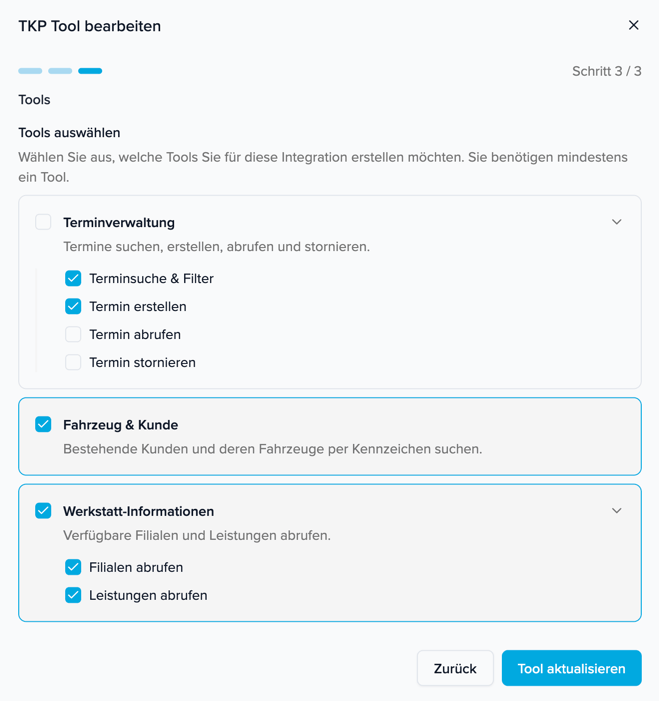
Services
In the “Services” tab you see all services available in your branch. Here you select which of them should be bookable through the voice agent. Example: If your dealership offers 25 different services but you only want to offer wheel changes through the voice agent, select only “Räderwechsel (eingelagert)” and “Räderwechsel (nicht eingelagert)” (wheel change with/without stored wheels).Recommendation: We strongly recommend describing all selected services in the prompt of your voice agent as well. Many services have no detailed description by default (e.g. “Service Standardumfang” or “UVV”). Without a clear description in the prompt, the AI model cannot map requests correctly and may assign customer requests to the wrong service.
- If a customer says “Ölwechsel” (oil change) and no clear mapping is defined, the AI model might incorrectly interpret this as “Service Standardumfang”.
- For services like “UVV” or “Anschreiben, Aktionen”, the AI model has no way of knowing what they mean without an explanation.
- In the prompt, you can explicitly define which customer requests should be mapped to which service.
Note: Customer data (name, phone number, email) is automatically taken from the search result when booking the appointment. The voice agent does not see this data and does not disclose it — it only confirms the make and model of the vehicle.